
Best AI Tools for Small Businesses in 2026 (Free & Paid)
Meta Title: Best AI Tools for Small Businesses 2026 | Free & Paid
Meta Description: Discover the best AI tools for small businesses in 2026. Compare free and paid options for writing, design, automation, CRM, and more—tested and reviewed.
URL Slug: best-ai-tools-small-businesses-2026
Last Updated: July 27, 2026
Disclosure: This article is not sponsored. Pricing and features change frequently. Verify current details on each vendor’s website before purchasing.
Key Takeaways
- ChatGPT Free and Canva Free handle the majority of small business AI needs without spending anything.
- Zapier Free connects your existing apps, but multi-step automation requires a paid plan starting around $20/month.
- HubSpot’s free CRM remains the most accessible entry point for customer relationship management with built-in AI.
- Most useful paid AI tools for small businesses fall in the $15–$25 per user per month range.
- Start with one free tool that solves your biggest bottleneck—do not build a full stack on day one.
Table of Contents
- How We Evaluated These Tools
- ChatGPT
- Grammarly
- Canva
- Notion AI
- Zapier
- HubSpot Breeze
- Perplexity
- Otter.ai
- Jasper
- Google Gemini
- Comparison Table
- How to Choose the Right Tool
- FAQ
- Conclusion
How We Evaluated These Tools
We selected and reviewed these tools based on criteria that matter to small business owners with limited technical staff and tight budgets.
Pricing transparency. We prioritized tools with a genuinely useful free tier and clear upgrade paths. Hidden fees and forced annual contracts were penalized.
Ease of use. Each tool must be usable by a non-technical owner within one hour of signup. No-code interfaces and strong onboarding were essential.
Integrations. We favored tools that connect with common small business software like Gmail, Google Workspace, Microsoft 365, Slack, and popular CRMs.
Support and documentation. Reliable help centers, chat support, and active user communities reduce the risk of getting stuck.
Security and privacy. We considered SOC 2 compliance, data handling policies, and whether business data is used to train AI models. Where possible, we note tools that exclude business data from model training by default.
ChatGPT
The general-purpose AI assistant that works like a digital coworker.
ChatGPT is an AI chatbot built by OpenAI that handles writing, research, coding assistance, and business strategy conversations through natural language prompts. For small businesses, it acts as a first-draft generator for emails, proposals, social media content, and standard operating procedures. The free tier is genuinely functional for light daily use, though it comes with usage caps and ads in some regions.
Best for: Solopreneurs, consultants, and small agencies that need a versatile AI assistant without a learning curve.
Key Features
- Natural language conversations for drafting and editing
- File upload and analysis (spreadsheets, PDFs, images)
- Custom GPTs for repeatable business tasks
- Code interpreter for basic data analysis
- Web browsing for real-time research (paid tiers)
Pricing (as of 2026—verify on vendor site)
- Free: $0 with message caps and limited model access
- Plus: $20/month for expanded usage and GPT-5.6 access
- Business: $20/user/month (annual) or $25/user/month (monthly), minimum 2 users; includes SSO and excludes data from training by default
Pros
- Extremely versatile across business functions
- Free tier is usable for real work
- Large community and extensive prompt tutorials
Cons
- Free users see ads and hit usage limits quickly
- Outputs require human fact-checking
- No native integration with business software on free tier

Grammarly
The silent editor that polishes every email and proposal before you hit send.
Grammarly is an AI writing assistant that checks spelling, grammar, tone, and clarity across the apps and websites where you already write. For small businesses, it reduces the risk of unprofessional communication in client emails, website copy, and social media posts. It runs in the background inside Gmail, Google Docs, LinkedIn, and most content management systems.
Best for: Service businesses, sales teams, and anyone whose brand reputation depends on clear written communication.
Key Features
- Real-time grammar and clarity suggestions
- Tone detection and adjustment recommendations
- Plagiarism detection (paid plans)
- Brand voice consistency for teams (Business plan)
- Browser extension and desktop app support
Pricing (as of 2026—verify on vendor site)
- Free: $0 with basic grammar and spelling checks
- Premium: Approximately $12–$15/month for advanced rewriting and tone features
- Business: Approximately $15/member/month for team features and brand voice management
Pros
- Works seamlessly in the background
- Immediate improvement in communication quality
- Useful for every employee, not just writers
Cons
- Advanced style suggestions require a paid plan
- Can over-flag informal but appropriate business language
- Not designed for long-form content creation from scratch

Canva
Professional design without hiring a designer or learning complex software.
Canva is a drag-and-drop design platform with thousands of templates for social media, presentations, flyers, and marketing materials. Its AI features include background removal, text-to-image generation, and brand kit management that keeps colors and fonts consistent across all assets. For small businesses, it replaces the need for expensive design software or freelance designers for routine marketing work.
Best for: Local businesses, e-commerce sellers, coaches, and anyone creating regular visual content without design skills.
Key Features
- Thousands of customizable templates
- AI-powered image generation and background removal
- Brand kit for consistent colors, fonts, and logos
- Social media scheduling and content planner
- Team collaboration and shared folders
Pricing (as of 2026—verify on vendor site)
- Free: $0 with core design tools and limited AI features
- Pro: $15/month or $120/year ($10/month effective)
- Teams: $10/person/month (minimum 3 people) or $100/person/year
Pros
- No design experience required
- Massive template library covers most business needs
- Free tier is genuinely sufficient for light use
Cons
- Premium assets and advanced AI features require paid plans
- Templates can look generic without customization
- Not a replacement for professional designers on complex projects

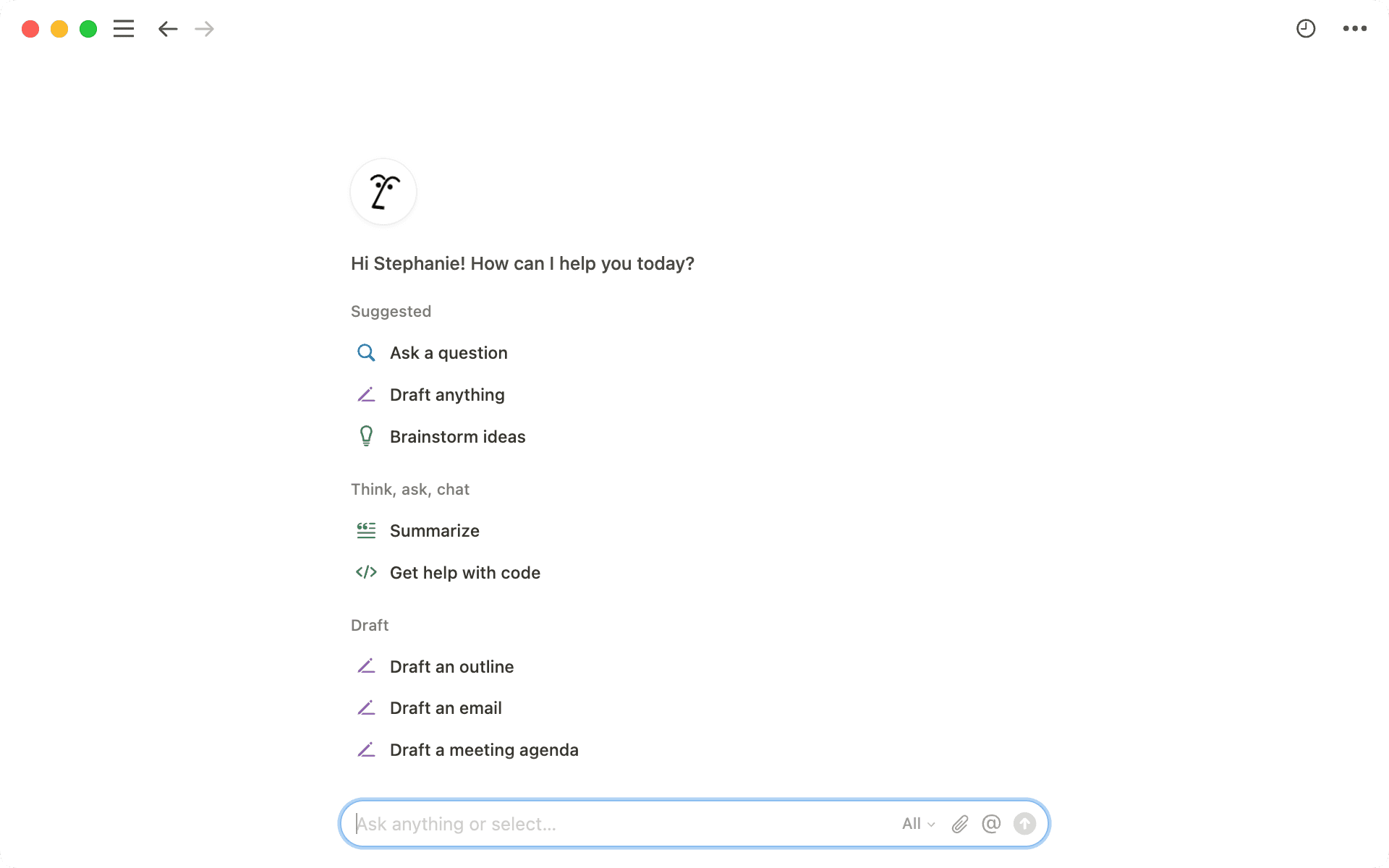
Notion AI
A single workspace where your notes, projects, and AI assistant live together.
Notion is a flexible workspace for documents, databases, and project management. Notion AI adds the ability to summarize meeting notes, draft content, and search across your company’s knowledge base using natural language. For small businesses, it replaces scattered Google Docs and sticky notes with one organized system that gets smarter as you add information.
Best for: Agencies, startups, and service businesses building standard operating procedures and internal documentation.
Key Features
- AI-powered writing and summarization inside documents
- Custom agents for recurring tasks like status updates
- AI meeting notes that drop summaries into project pages
- Enterprise search across your workspace
- Templates for SOPs, content calendars, and onboarding
Pricing (as of 2026—verify on vendor site)
- Free: $0 for individuals and light collaboration
- Plus: $10–$12/member/month
- Business: $20–$24/member/month; includes AI features like agents and meeting notes
Pros
- Combines documents, databases, and AI in one tool
- AI answers draw from your actual pages, not generic web data
- Highly customizable for different business workflows
Cons
- AI features worth using require the Business tier
- Custom agents consume separate credits that add variable costs
- Requires discipline to maintain organized information
Zapier
The glue that connects your apps so data moves without manual copying and pasting.
Zapier is a no-code automation platform that links over 9,000 apps to create workflows—called Zaps—that trigger actions across your software stack. For example, a new lead from a website form can automatically be added to your CRM, trigger a Slack notification, and send a welcome email. For small businesses, it eliminates the repetitive data entry that eats up hours each week.
Best for: Online businesses, agencies, and any team using multiple apps that do not talk to each other natively.
Key Features
- 9,000+ app integrations without coding
- Multi-step Zaps with filters, paths, and formatting
- AI-assisted Zap building through Zapier Copilot
- Webhooks for custom connections
- Zapier Tables and Forms for simple data collection
Pricing (as of 2026—verify on vendor site)
- Free: $0 with 100 tasks/month and 2-step Zaps only
- Professional: $19.99/month (annual) or $29.99/month (monthly) for 750 tasks and multi-step Zaps
- Team: $69/month (annual) for 2,000 tasks and shared workspaces
Pros
- Connects virtually any app your business already uses
- No coding required to build automations
- Free tier is useful for testing simple workflows
Cons
- Task-based pricing escalates quickly with complex multi-step Zaps
- Free plan limited to two-step automations
- Cheaper alternatives exist for high-volume automation (Make, n8n)

HubSpot Breeze
AI built directly into a CRM that grows with your customer base.
HubSpot Breeze is the AI layer inside HubSpot’s CRM platform, covering marketing, sales, and customer service. It uses your existing customer data to draft emails, score leads, and suggest next steps in deals. For small businesses already using HubSpot for contact management, Breeze adds intelligence without requiring a separate tool. The free CRM tier remains genuinely useful for early-stage businesses.
Best for: Small businesses with active sales processes that need CRM and basic marketing automation in one platform.
Key Features
- AI-powered email drafting and follow-up suggestions
- Prospecting agent that monitors accounts for buying signals
- Customer service agent for automated support responses
- Embedded analytics and deal forecasting
- Native integration with HubSpot’s CMS and email tools
Pricing (as of 2026—verify on vendor site)
- Free CRM: $0 with contacts, deals, and basic email
- Starter: $15/seat/month (annual) or $20/seat/month (monthly) with 1,000 contacts
- Professional: From $890/month with 3 seats (significant price jump; verify current rates)
Pros
- Free CRM is robust enough for many small businesses
- AI features work natively with your customer data
- HubSpot for Startups program offers discounts up to 75% for eligible companies
Cons
- Meaningful automation requires expensive Professional tier
- Pricing escalates sharply as you add contacts and seats
- AI agent usage consumes credits billed on top of base plans

Perplexity
Research that cites its sources, so you can verify every claim before acting on it.
Perplexity is an AI search engine that answers complex questions with summarized responses and inline citations to original sources. For small businesses, it accelerates market research, competitor analysis, and software evaluation by eliminating the need to open dozens of browser tabs. Unlike a standard search engine, it synthesizes information and presents it in a readable format with links back to primary sources.
Best for: Founders, consultants, and marketers who need fast, sourced research for strategic decisions.
Key Features
- AI-generated answers with inline source citations
- Focused search modes (Academic, Reddit, YouTube, News)
- File upload for analyzing documents and PDFs
- Pro search for deeper, multi-step research queries
- Enterprise options with enhanced security
Pricing (as of 2026—verify on vendor site)
- Free: $0 with standard search and limited Pro queries
- Pro: Approximately $20/month for unlimited Pro searches and advanced models
- Enterprise: Custom pricing for teams with SSO and data controls
Pros
- Source citations enable fact-checking
- Faster than manual research across multiple sites
- Clean interface with minimal learning curve
Cons
- Sources should still be verified independently
- Not a replacement for professional industry analysis
- Advanced features require paid plans

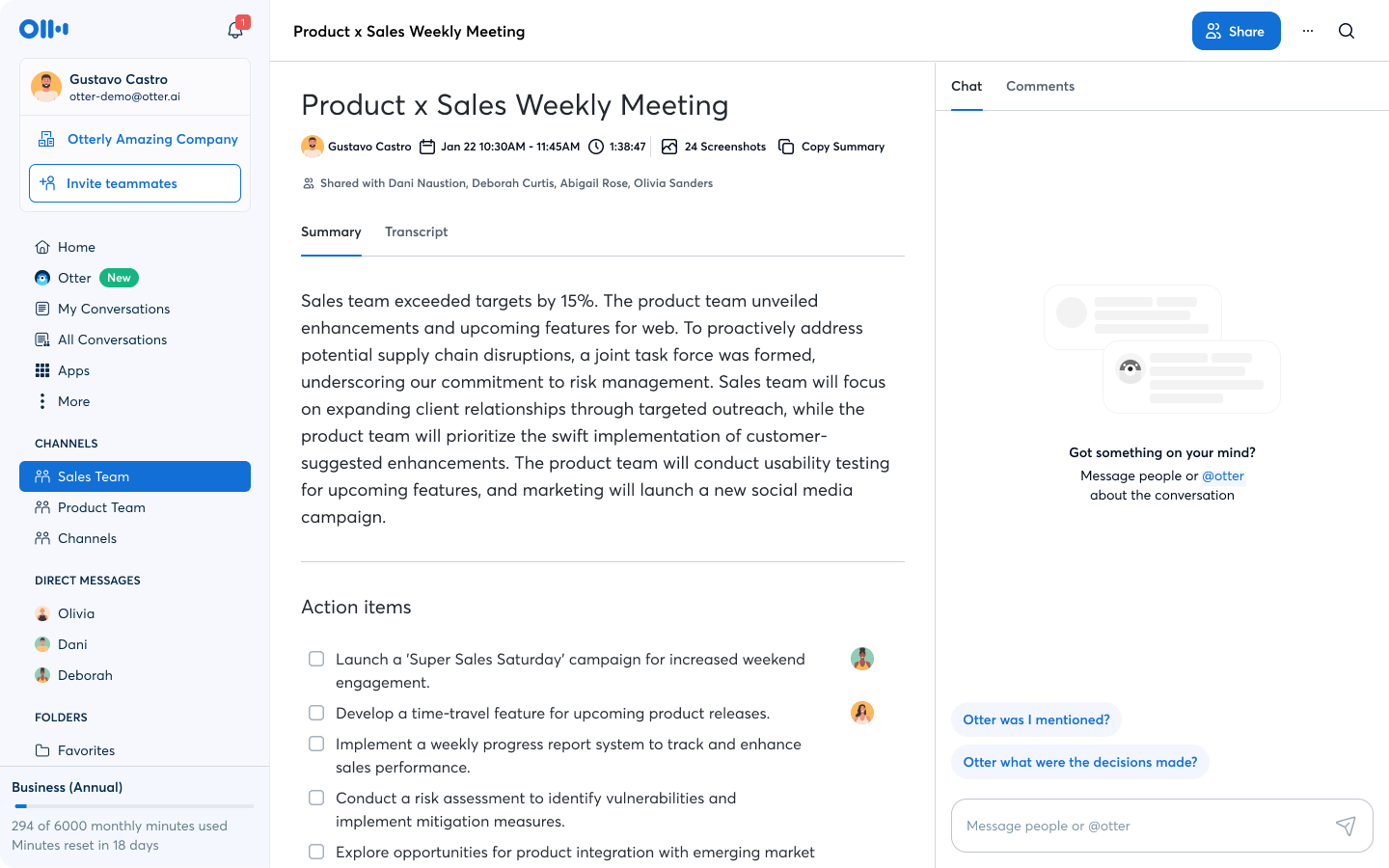
Otter.ai
Meeting notes that write themselves while you stay present in the conversation.
Otter.ai is an AI transcription tool that joins Zoom, Microsoft Teams, and Google Meet calls to produce real-time transcripts, summaries, and action items. For small businesses, it eliminates the need for manual note-taking during client calls, sales meetings, and team standups. The searchable archive means you can revisit conversations months later without relying on memory.
Best for: Consultants, agencies, sales teams, and any business where meetings generate decisions that need documentation.
Key Features
- Real-time transcription for live meetings
- Automatic summaries and action item extraction
- Searchable conversation history
- Integration with Zoom, Teams, and Google Meet
- AI chat to ask questions about past meetings
Pricing (as of 2026—verify on vendor site)
- Free: $0 with 300 transcription minutes/month and 30-minute cap per conversation
- Pro: $16.99/month or $99.96/year (~$8.33/month) with 1,200 minutes
- Business: $30/month or $239.88/year (~$19.99/month) with unlimited meetings
Pros
- Accurate transcription on clear audio
- Eliminates post-meeting note-taking
- Free tier covers light meeting schedules
Cons
- 300-minute monthly cap on free plan is easy to exceed
- Transcript access limited to 30 minutes per conversation on free tier
- Privacy considerations when recording client calls (disclosure required)
Jasper
Marketing content that stays on-brand across every channel and team member.
Jasper is an AI writing platform built specifically for marketing teams. It goes beyond generic AI writing by enforcing brand voice consistency, offering 50+ marketing templates, and enabling team collaboration on campaigns. For small businesses producing high volumes of blog posts, ad copy, and social content, Jasper reduces the editing time required to keep everything sounding like it came from one brand.
Best for: Small marketing teams and agencies that produce 15+ content pieces monthly and struggle with brand consistency.
Key Features
- Brand voice engine trained on your existing content
- 50+ marketing templates for ads, blogs, emails, and social posts
- Campaign planning from a single brief
- Team collaboration and approval workflows
- Integration with Surfer SEO for content optimization
Pricing (as of 2026—verify on vendor site)
- Creator: $49/month ($39/month annual) for 1 seat, 1 brand voice
- Pro: $69/month ($59/month annual) for up to 5 seats, 2 brand voices
- Business: Custom pricing for unlimited seats and advanced features
Pros
- Strong brand voice consistency across writers
- Marketing-specific templates reduce prompt engineering
- Campaign feature coordinates multi-asset projects
Cons
- Expensive entry point compared to general AI assistants
- No permanent free plan; only a 7-day trial
- Surfer SEO integration requires a separate subscription (~$89/month)

Google Gemini
AI that lives inside the Google apps your business already uses every day.
Google Gemini is an AI assistant integrated directly into Gmail, Google Docs, Sheets, and Drive. For small businesses already running on Google Workspace, Gemini reduces context switching by letting you draft emails, summarize threads, and analyze spreadsheets without leaving the app. It understands the context of your existing documents and conversations, making suggestions that reference your actual business data.
Best for: Small businesses, educators, and consultants who rely heavily on Gmail, Google Docs, and Google Drive for daily operations.
Key Features
- Email summarization and draft generation in Gmail
- Document drafting and rewriting in Google Docs
- Spreadsheet analysis and formula suggestions in Sheets
- Deep Research for comprehensive topic exploration
- Veo video generation for marketing content
Pricing (as of 2026—verify on vendor site)
- Free: $0 with Gemini Flash and basic features
- AI Plus: $4.99/month for expanded limits and Gemini 3 Pro
- AI Pro: $19.99/month for Deep Research, Veo video, and 5 TB storage
Pros
- Seamless integration with Google Workspace
- No need to switch between apps for AI assistance
- Generous free tier for casual business use
Cons
- Best features require paid plans
- Less powerful than ChatGPT or Claude for complex reasoning tasks
- Frequent UI changes can disrupt established workflows

Comparison Table
| Tool | Category | Free Tier? | Starting Paid Price | Best For | Standout Feature |
|---|---|---|---|---|---|
| ChatGPT | AI Assistant | Yes | $20/month | General business tasks | Custom GPTs for repeatable workflows |
| Grammarly | Writing & Editing | Yes | ~$12/month | Professional communication | Real-time tone and clarity suggestions |
| Canva | Design & Marketing | Yes | $15/month | Visual content creation | AI background removal and brand kit |
| Notion AI | Knowledge Management | Yes | $20/member/month | Documentation & SOPs | AI answers from your own pages |
| Zapier | Automation | Yes | $19.99/month | App integration | 9,000+ app connections without code |
| HubSpot Breeze | CRM & Sales | Yes | $15/seat/month | Customer management | AI agents using live CRM data |
| Perplexity | Research | Yes | ~$20/month | Market & competitor research | Sourced answers with citations |
| Otter.ai | Meeting Notes | Yes | $16.99/month | Call documentation | Real-time transcription with action items |
| Jasper | Marketing Content | No (trial only) | $49/month | Content marketing teams | Brand voice engine for consistency |
| Google Gemini | Productivity | Yes | $4.99/month | Google Workspace users | Native Gmail, Docs, and Sheets integration |
How to Choose the Right Tool
Selecting an AI tool should start with your biggest operational bottleneck, not with the most hyped product.
By Budget
- $0: Start with ChatGPT Free, Canva Free, Grammarly Free, and HubSpot Free CRM. This combination covers writing, design, communication, and customer management.
- Under $25/month: Add Zapier Professional for automation, Otter.ai Pro for meetings, or Google Gemini AI Pro for productivity inside Google Workspace.
- Over $50/month: Only upgrade to Jasper or HubSpot Professional if your content volume or sales pipeline justifies the cost.
By Team Size
- Solo operators: Prioritize versatile tools like ChatGPT Plus and Canva Pro. Avoid per-seat pricing until you hire.
- 2–5 person teams: Introduce shared workspaces like Notion Business and Zapier Team to coordinate work.
- 5+ person teams: Consider HubSpot Starter or Jasper Pro to enforce consistency across customer-facing roles.
By Use Case
- Writing and communication: Grammarly + ChatGPT
- Marketing and design: Canva + Jasper (if high volume) or ChatGPT (if budget-conscious)
- Operations and documentation: Notion AI + Otter.ai
- Sales and CRM: HubSpot Breeze
- Research and strategy: Perplexity + ChatGPT
In our assessment, the best approach is to run one free tool for 30 days, measure the time saved, and then decide whether a paid upgrade delivers proportional value.
FAQ
Are free AI tools actually useful for business, or just toys?
Free tiers from ChatGPT, Canva, Grammarly, and HubSpot handle real business workloads. The limitations are usually usage caps, not capability restrictions. For a solo business owner, free tools often suffice for the first 6–12 months.
Which AI tool should a small business buy first?
Start with the tool that addresses your most time-consuming task. If you spend hours writing, choose ChatGPT Plus or Grammarly Premium. If design is your bottleneck, choose Canva Pro. If meetings consume your afternoons, choose Otter.ai.
Is my business data safe with these AI tools?
Security varies by vendor. ChatGPT Business and Enterprise exclude your data from model training by default. HubSpot and Grammarly maintain SOC 2 compliance. Always review a vendor’s privacy policy before uploading sensitive customer or financial data.
Do these tools require technical skills to set up?
None of the tools listed require coding. Zapier is the most complex to configure, but it uses a visual drag-and-drop interface. Most users can set up basic workflows within an hour.
Can I use multiple AI tools together?
Yes, and that is where the real productivity gains live. For example, use Perplexity for research, ChatGPT for drafting, Grammarly for polishing, and Canva for visuals. Zapier can connect these tools to your CRM or email platform for a cohesive workflow.
Will AI tools replace my employees?
In our assessment, AI tools augment human work rather than replace it. They handle first drafts, repetitive tasks, and data entry. Strategic decisions, client relationships, and final quality control still require human judgment.
Conclusion
The best AI tool for your small business is the one you will actually use tomorrow. Start with the free tier that matches your biggest bottleneck—whether that is writing, design, meetings, or customer management. Run it for 30 days, measure the time saved, and upgrade only when the paid features solve a specific problem you have already identified.
You do not need a dozen AI tools to compete. You need one or two that fit your workflow and budget. Pick one from this list, start with the free tier, and let the results guide your next move.
Leave a Reply